Connect the systems your AI workforce needs to work safely.
ApexRouter is not a model reseller. It is the control layer that connects agents, tools, E2B sandboxes, and APIs so work can move through your operation under strict policies.
Governance and execution controls connect through one layer.
Teams do not need another isolated chat box. ApexRouter is designed to sit above the tools you already pay for and coordinate the agents, files, messages, and workflows around them.
Agent registry & BYOK model connections
Coordinate external agents (Aider, Claude Code), custom scripts, and model endpoints using your own LLM keys.
Business applications
Integrate with GitHub, databases, Slack, CRMs, and ticketing systems under strict policy checks.
Knowledge sources
Attach briefs, policies, research, and reusable files to workflows with strict tenant boundary isolation.
Slack & email channels
Keep teams informed with dashboard updates, trace logs, and pending approval notifications.
High-throughput REST API
Start approved workflows, pass context, track execution, and retrieve outcomes programmatically.
Security & governance controls
Set workspace roles, budget limits, approval gates, and filesystem permission rules.
Built as a control layer, not another isolated agent box.
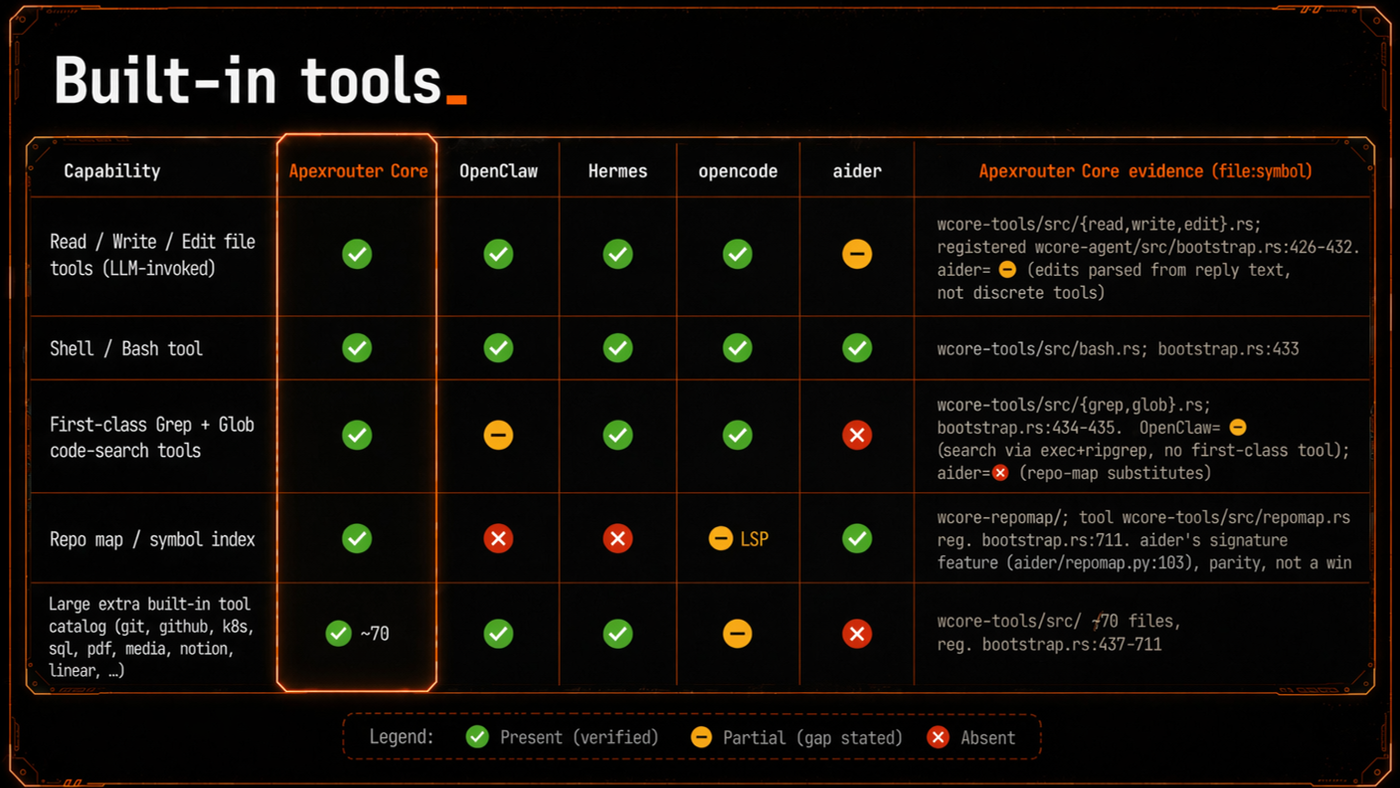
ApexRouter is designed around the comparison questions that matter in production: provider flexibility, orchestration depth, security posture, tool coverage, and extensibility. The platform sits above your existing agents and systems so teams can route work instead of manually babysitting every tool.
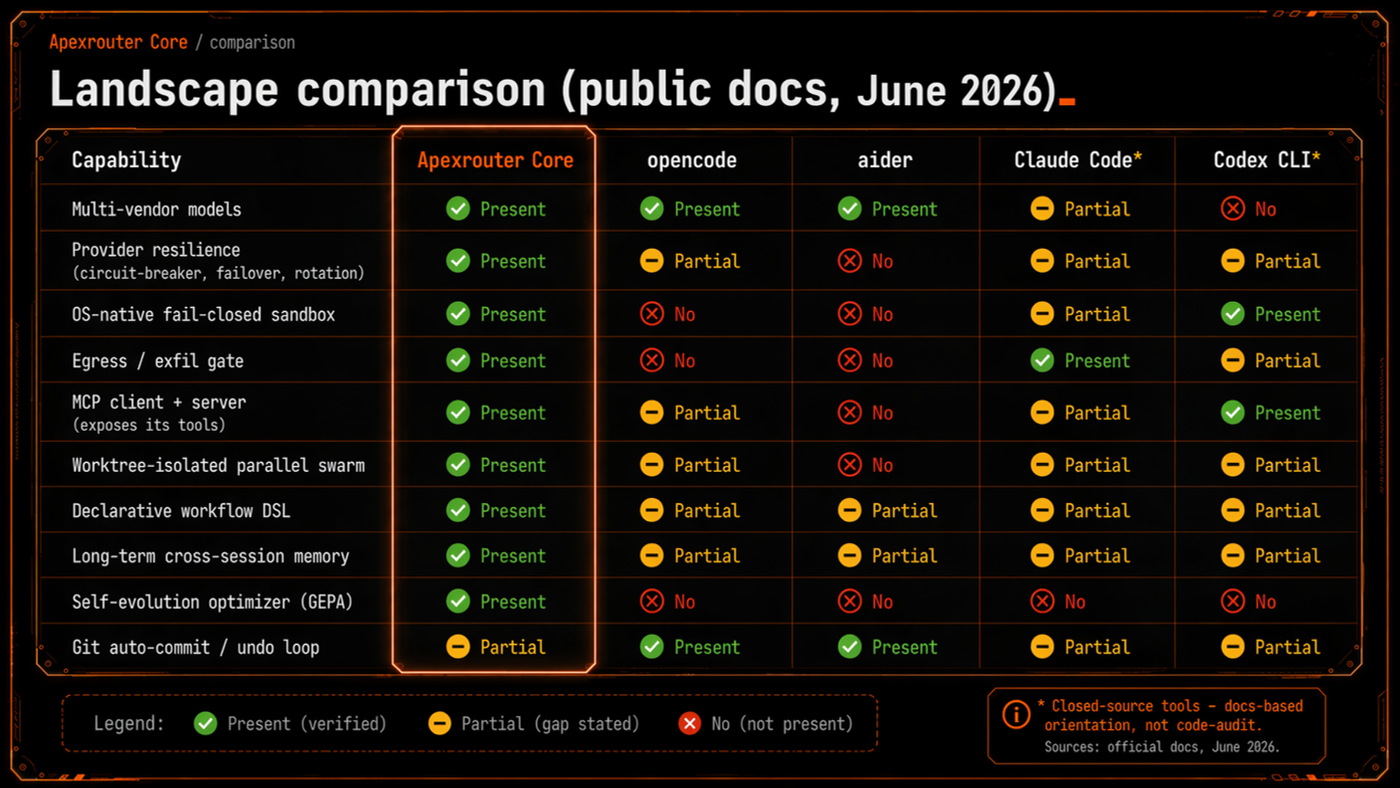
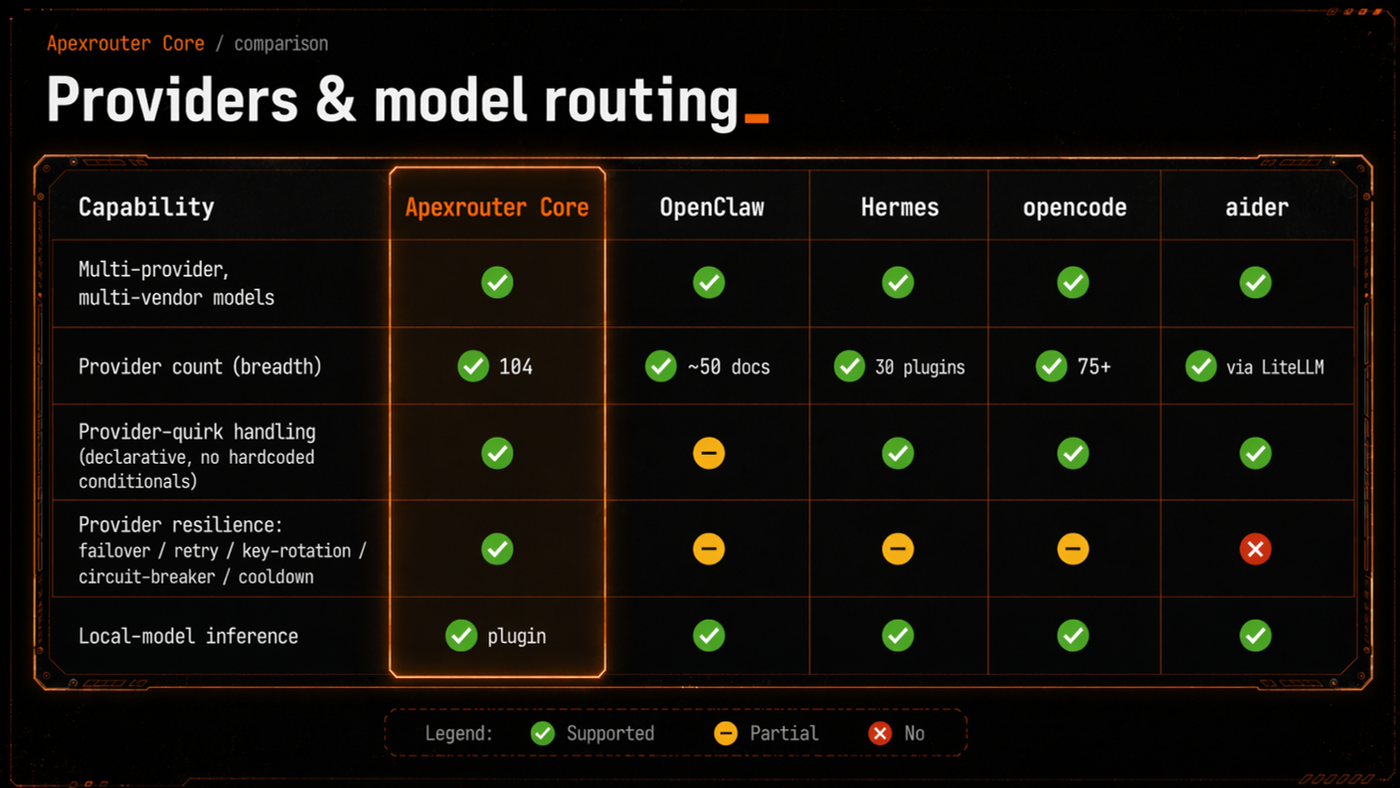
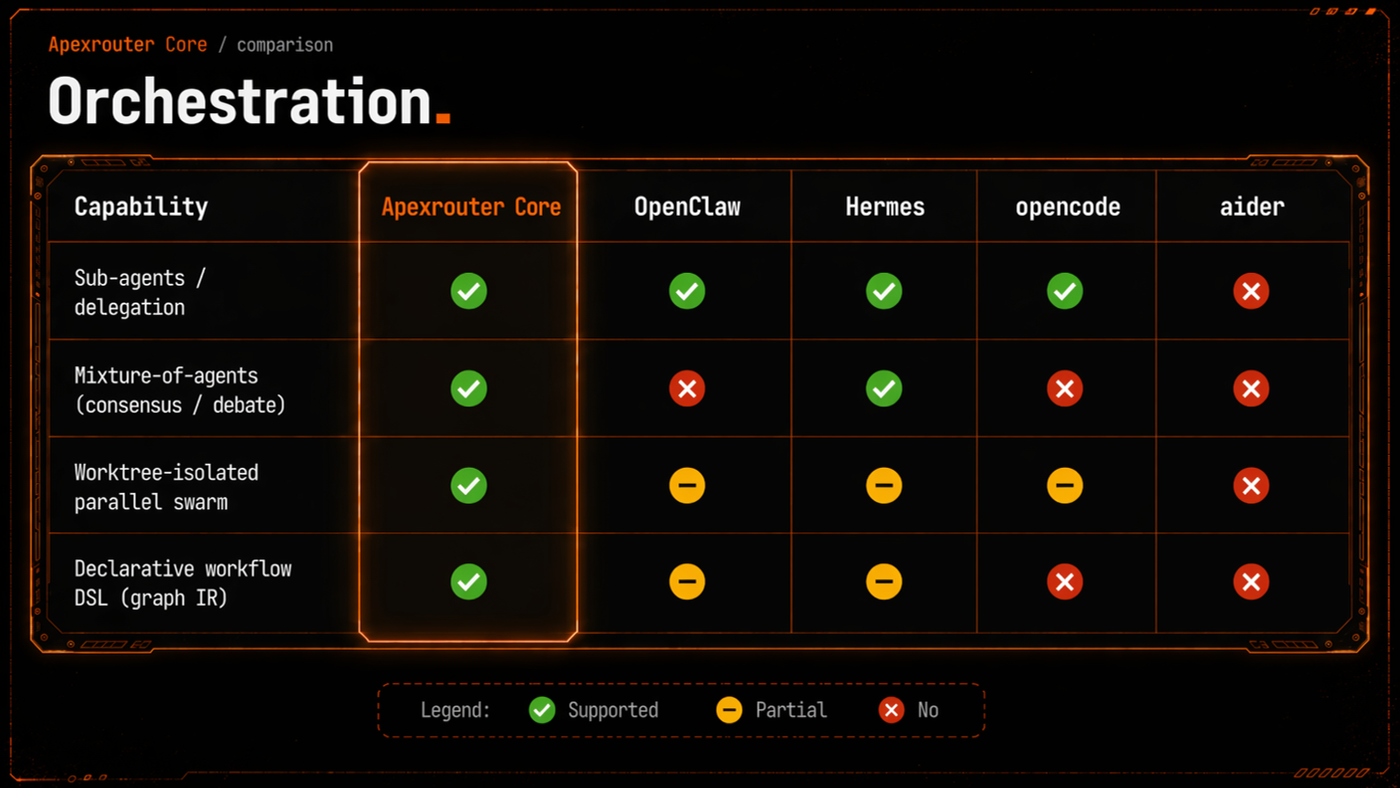
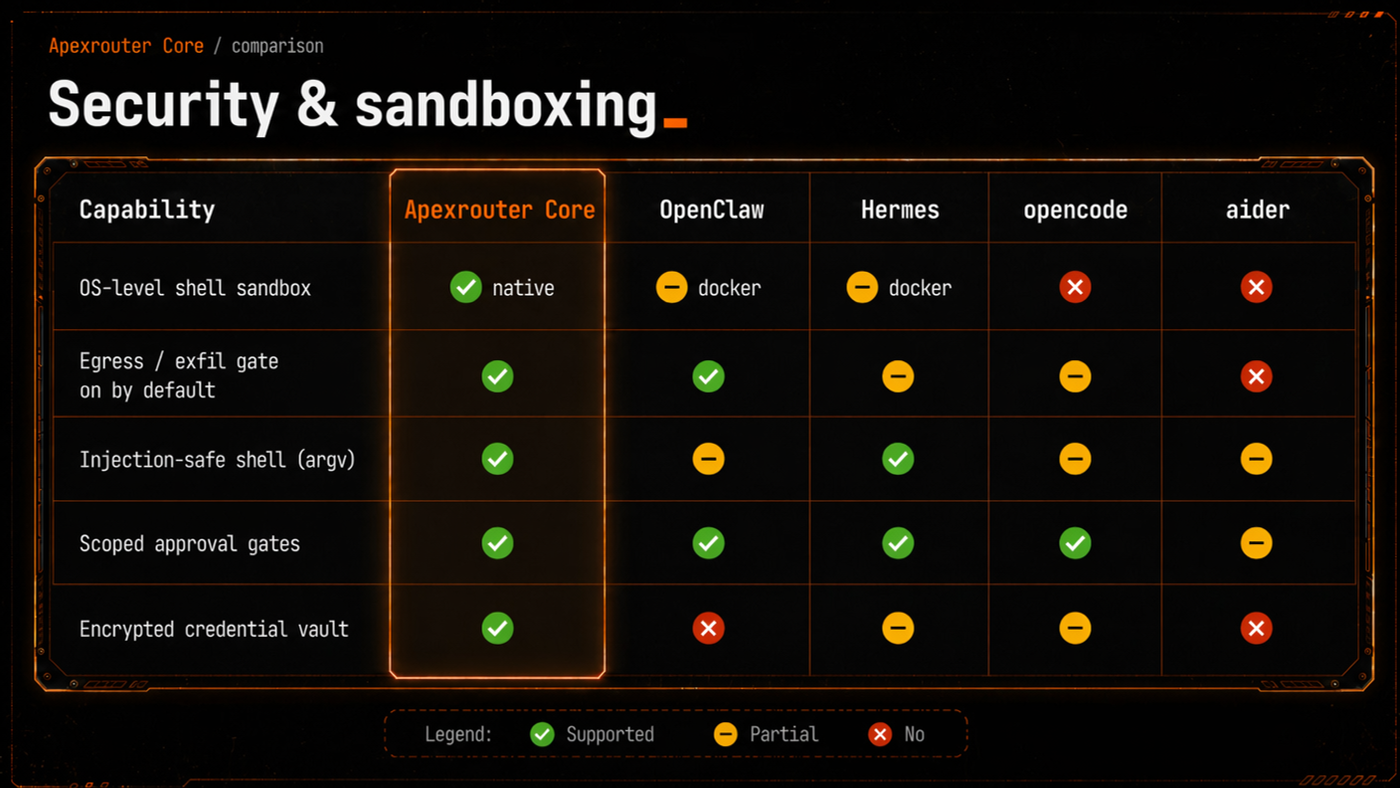
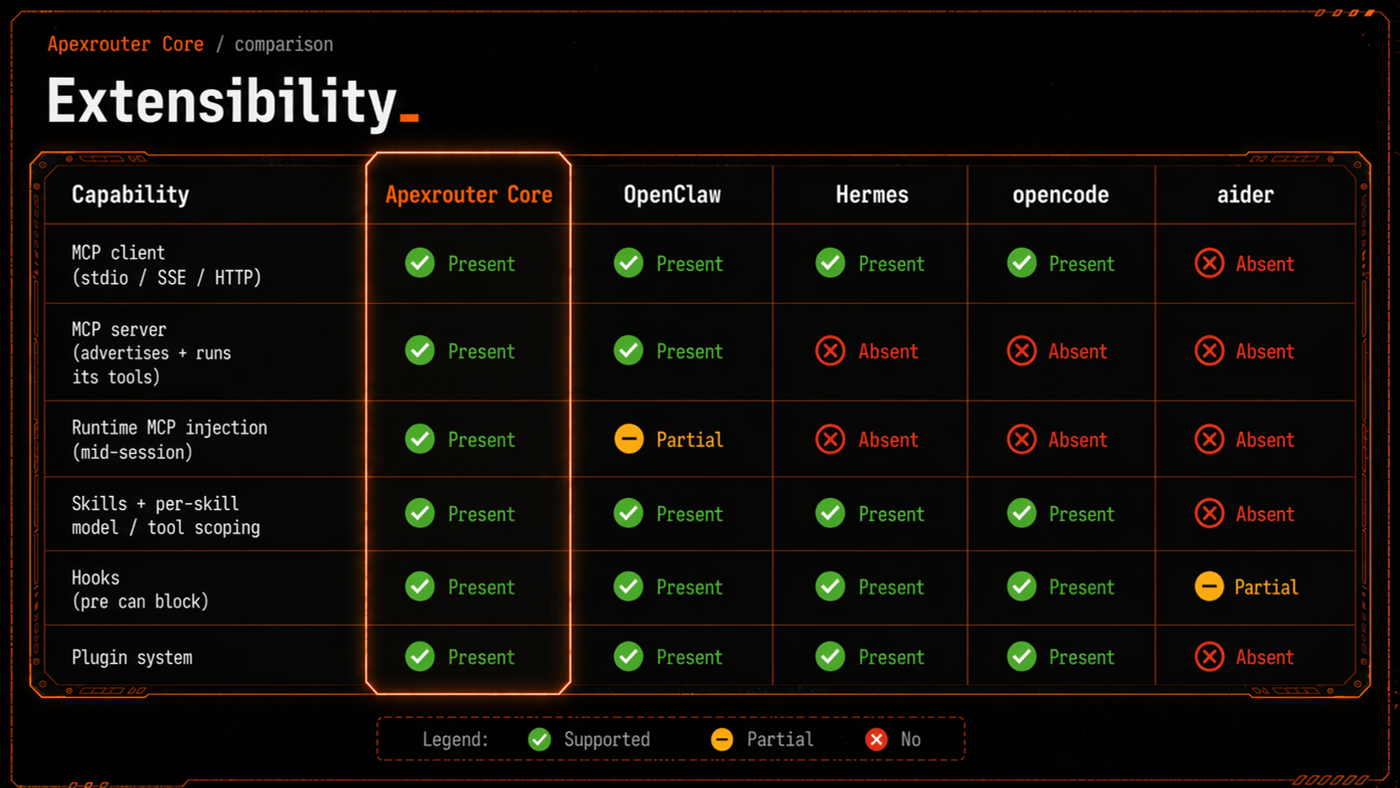
Use these comparison areas to evaluate ApexRouter against disconnected agent chats, direct model integrations, and single-agent automations.
Where investor and enterprise reviewers should see immediate demand.
Developer automation
Run code review, repo maintenance, documentation, dependency analysis, migration planning, and release preparation with reviewable traces.
Customer operations
Summarize tickets, research accounts, prepare escalation briefs, draft follow-ups, and coordinate support handoffs through governed workflows.
Revenue operations
Research leads, enrich accounts, prepare proposals, monitor pipeline signals, and turn repeatable sales tasks into auditable workflows.
Internal knowledge
Connect policies, documents, historical decisions, meeting notes, and team preferences so agents can answer with workspace context.
Executive reporting
Schedule recurring summaries, risk checks, usage reports, project updates, and operational digests without manual status chasing.
Product operations
Turn feedback, research, release notes, QA findings, and roadmap inputs into structured workflows with ownership and review.
The control plane sits between people, agents, tools, and model infrastructure.
ApexRouter is designed as an orchestration layer: users define goals and policies, workflows attach context, agents operate inside bounded environments, model calls are routed through configured providers, and every meaningful action becomes part of the operational record.
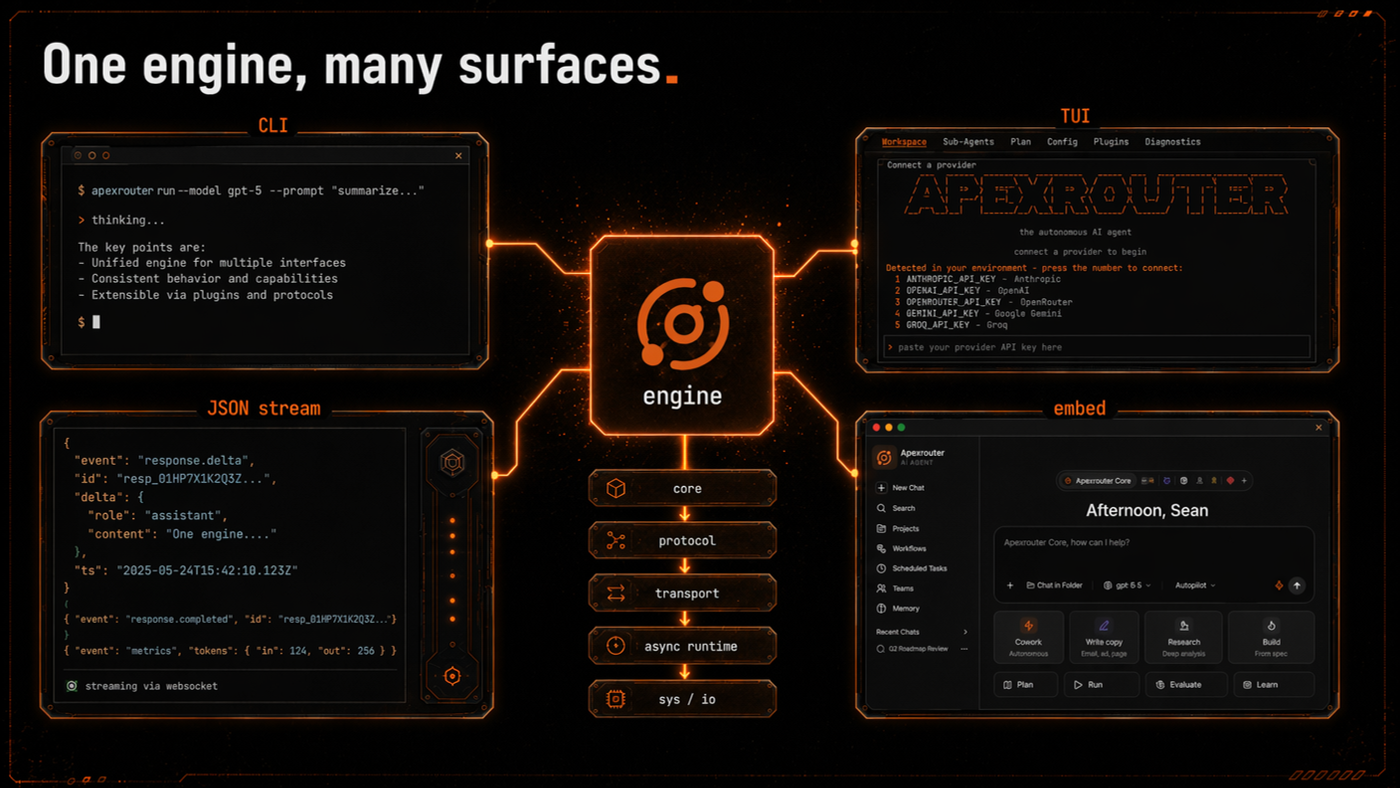
Control plane
Workspace rules, roles, limits, approvals, and audit policies define what work can run and who owns it.
Execution plane
Agents, tools, files, and workflows run through scoped execution boundaries rather than uncontrolled local machines.
Model plane
BYOK providers, managed model endpoints, and customer-selected models can be routed according to cost, capability, and governance needs.
Components are organized around security, not just integrations.
Workspaces
Workspaces segregate keys, secrets, vector memory, and user roles into secure operational boundaries.
- Shared workspace context
- Uploaded briefs and references
- Outcome history
- Strict tenant boundaries
Agent Registry
Connect pre-existing agent frameworks like Aider, Claude Code, or custom scripts with ease.
- BYOK model connections
- Custom agent setup
- Environment variable config
- Sandbox mount rules
Permission Policies
Set granular rules for file read, write, and delete operations to automate benign tasks.
- Filesystem access rules
- Auto-approval matching
- Risky command filters
- Human review triggers
Sandboxed Tools
Mount pre-audited development and DevOps skills within isolated E2B sandbox containers.
- Pre-audited capabilities
- Tool mount controls
- Container limit rules
- Clean workspace destruction
Trigger workflows from your product, backend, or internal systems.
API access is for teams that want ApexRouter inside their own operating stack. Your product can start workflows, pass context, track state, and receive outcomes while ApexRouter coordinates agents and review paths behind the scenes.
Start a workflow
Send a goal, workspace, user context, files, and constraints from an internal tool or customer-facing product.
Track progress
Retrieve workflow state, pending review points, completion status, and outcome metadata without forcing operators to switch tools.
Respect rules
Keep API usage aligned with roles, workspace access, workflow limits, and governance policies.
Less switching, clearer ownership, better repeatability.
One place to see work
Operators can see what is running, which agent owns the next step, where review is needed, and what finished.
One place to attach context
Teams stop re-explaining the same business rules, files, customers, products, and preferences across disconnected tools.
One place to govern usage
Admins can align AI work with roles, policies, capacity, workflow rules, and customer-facing risk controls.